From Zero to Dataset: Building an SEO Intelligence Assistant with DeepFabric
Building AI agents that can actually use tools effectively requires high-quality training data. In this tutorial, we'll walk through creating a synthetic dataset for an SEO intelligent assistant using DeepFabric's tool-calling capabilities and the DataForSEO API suite.
What We're Building
Our goal is to develop an SEO intelligent assistant powered by synthetic data and tool-calling capabilities. We've chosen DataForSEO's API suite for this project—it covers everything from backlink analysis and keyword research to AI optimization metrics, making it an ideal foundation for training a frontier model to handle complex SEO strategies.
This tutorial is split into two parts. In Part 1 (this post), we'll use the DeepFabric open source project to create a synthetic dataset with tool calls to DataForSEO. In Part 2, we'll fine-tune a language model with this dataset and hook it into an agent framework.
Here's what we'll cover in this first installment:
- Quick Start: Installing DeepFabric and its dependencies using uv, ensuring the CLI is fully functional.
- Spinning Up the Mock Service: Setting up a mock service using the SPIN framework to simulate DataForSEO API endpoints. This is a crucial step for providing a realistic environment for deepfabric to work with when creating a synthetic dataset that incorporates these tools calls.
- Data Generation Pipeline: Defining a topic prompt, generating a complex topic graph, and executing our first synthetic dataset generation run that will interact with the mock DataForSEO service above to learn and embed these tool calls into the dataset.
By the end of this guide, you'll have a complete, ready-to-use dataset tailored for an SEO assistant, plus the knowledge to apply this methodology to any tool-calling scenario.
Tools and Environment
This tutorial uses a Mac environment with several key tools:
- uv for Python project and dependency management
- DeepFabric as the core framework for synthetic data generation and tool calling
- SPIN framework (via DeepFabric provided Docker image) to simulate the DataForSEO API endpoints
- Gemini 2.5 Flash as the frontier model for knowledge distillation (or optionally a local model via Ollama)
- Claude Code to help automate boilerplate file creation
Setting Up DeepFabric
I'm cloning the entire DeepFabric repo rather than just installing the package—this gives us access to the helpful examples in the repository. I'll also be using Claude Code to assist with some of the more mundane tasks and to provide these examples to Claude.
Let's get started with the setup:
shell
DeepFabric generates data by distilling information from a frontier model. It supports major vendors—for this guide, we're using Gemini 2.5. You can also use a local model served via Ollama if you prefer. To use the frontier model, we need to tell DeepFabric our API keys. DeepFabric can pick these up from environment variables, so I'll create a .env file in the directory to manage this specifically adding and exporting the GEMINI_API_KEY="" value. Following this setup, I'll verify the deepfabric CLI is working.
shell
At the time of running this, the version returned deepfabric, version 4.7.1.
Creating the Local Mock DataForSEO Endpoint
Here's why we need a mock service: it allows us to safely and efficiently generate a synthetic dataset where the LLM from which the dataset is distilled learns to include accurate and contextual tool calls. Essentially, we're simulating the real-world responses of the DataForSEO API without incurring costs or depending on the live service during data creation.
The process involves five steps:
- Run the SPIN service via Docker
- Capture the tool calls from the MCP server and push them into SPIN
- Create mock test data for DataForSEO
- Load that mock data into the mock DataForSEO SPIN service
- Test some mock DataForSEO API calls
Step 1: Running the SPIN Service
We'll pull the DeepFabric tools-SDK Docker container, which houses a customized version of the SPIN framework:
shell
Step 2: Importing the Tools
Once the container is running, we need to import the tools for the MCP service. The DeepFabric documentation is helpful here, but the CLI also provides good guidance. You can use deepfabric import-tools --help for more information.
I want to import the tool structure into the Docker SPIN service and output the schema of the tool calls to a file to help when creating mock tool response data:
shell
Step 3: Creating Mock Data
With the endpoints simulated in the SPIN service, the next step is providing mock call responses. The DataForSEO documentation is excellent and includes many example API responses. Rather than manually copying these from the documentation, I'll use Claude Code to do the heavy lifting.
Given that:
- DeepFabric provides existing examples for mocking other MCP services (Blender, Figma, GitHub, etc.)
- I have the endpoints for the DataForSEO MCP in the YAML file
- I have access to the DataForSEO documentation
I crafted the following prompt for Claude Code:
The file dataforseo-schema.yaml is the api schema in YAML for the dataforseo
MCP server describing the tool calls.

I need to create mock data for this schema that I can use against the
deepfabric spin tools. Examples of mock data for other MCP services, such as
figma, blender, github and kubernetes are here ./examples/tools-sdk-examples

Generate a dataforseo-mock-data.json similar to these other examples based
off the schema files and the DataForSEO documentation at
https://docs.dataforseo.com/v3/
Claude Code generated a comprehensive mock data file covering:
9 API Categories:
- AI Optimization Tools (11 tools) - LLM metrics, keyword data, model listings
- SERP Tools (9 tools) - Google organic search, YouTube data, locations
- Keyword Data Tools (9 tools) - Google Ads search volume, trends data
- On-Page Analysis Tools (4 tools) - Content parsing, page optimization scores
- DataForSEO Labs Tools (25 tools) - Ranked keywords, competitors, domain analysis
- Backlinks Tools (23 tools) - Backlinks, anchors, referring domains
- Business Data Tools (1 tool) - Google Maps business listings
- Domain Analytics Tools (6 tools) - WHOIS data, technology detection
- Content Analysis Tools (3 tools) - Content search, sentiment analysis
The mock data includes realistic metrics, URLs, domains, statistics, and pre-configured scenarios for popular use cases. It save the file as dataforseo-mock-data.json .
Now you can spend more time refining this and cross-checking your examples with the API suite from DataForSEO and I would recommend you do this but for now I’ll go with these sample responses.
Step 4: Loading the Mock Data
Now we need a script to load this mock data into the service. Again, I asked Claude Code to help:
Create a load file based on the blender or figma example so I can load
the mock data into the spin tool. There are load mock data shell
scripts in the examples folder.
Claude Code created a complete setup for me in examples/tools-sdk-examples/dataforseo/ with three files:
dataforseo-mock-data.json- Comprehensive mock data with 67+ tool definitionsload-dataforseo-mock-data.sh- Executable bash script for loading dataREADME.md- Complete documentation
The script was already made executable by Claude, so I can run it directly. This loads the mock response calls into the docker SPIN service:
shell
Step 5: Testing the Mock Service
The shell script includes example calls for testing. Let's verify the mock MCP service is working correctly:
shell
You should see the mocked data response, confirming everything is working by calling one of the mock APIs.
Configuring DeepFabric for Dataset Generation
With the SPIN service set up to receive mock DataForSEO calls, we can start generating test data that incorporates tool calls against this service.
Understanding the DeepFabric Workflow
The process for generating a synthetic dataset with integrated tool calls involves two steps, which I've summarized here and we'll go into more detail after.
Step 1: Generate the Topic Graph
- Goal: Create a structured blueprint for the dataset
- Function: Using a frontier model (Gemini 2.5 Flash), recursively explore and structure the subject matter based on the main topic prompt
- Output: A hierarchy of specific, relevant sub-tasks and concepts ensuring comprehensive coverage
- Command:
deepfabric generate --topic-only ./spin-dataforseo.yaml
Step 2: Generate the Dataset
- Goal: Generate high-quality, synthetic conversational data based on the topic graph structure
- Function: For each node in the graph, distill information from the frontier model, generating detailed conversations, questions, and answers. When generating responses that require specific SEO metrics or actions, the model incorporates explicit tool calls to DataForSEO tools, simulated against our local mock service
- Output: A dataset containing complex ReAct interactions with correct syntax for invoking external tools
- Command:
deepfabric generate --topics-load ./dataforseo-topics.jsonl ./spin-dataforseo.yaml
Creating the DeepFabric Configuration File
The topic graph and dataset generation are seeded from an initial prompt. For this project, our prompt is:
Tasks for a SEO assistant that helps with SEO strategies and digital marketing using the DataForSEO tools.
All DeepFabric configuration can be held in a YAML file. Let's ask Claude Code to create this for us from existing examples:
I now need to create a configuration YAML file for deepfabric to
generate the topic and dataset. Again there are examples in the
./examples/tools-sdk-examples/ folder and also examples in
./examples/.

Using these examples and the tool calls from the DataForSEO MCP
server generate a file called spin-dataforseo.yaml that contains the
necessary deepfabric configuration to create topics with the prompt
"Tasks for a SEO assistant that helps with SEO strategies and digital
marketing using the DataForSEO tools.". For the data generation
configuration, specify a suitable system prompt using the tools
captured in dataforseo-schema.yaml. I want to use gemini-2.5-flash as
the frontier model.
Reviewing the Configuration
Claude Code generated the config file. Let's examine the topics section:
yaml
The prompt is included, and Claude Code specified tree mode with a depth and degree of 5x5. Since DeepFabric is deprecating tree mode in favor of graph mode (more versatile and faster), I'll change the mode to graph but keep the depth and degree settings for now.
The LLM sub-section uses Gemini as requested. Claude also added a rate limiting section, but I'll remove it for now since the defaults work well for Gemini. I'll also update the save_as filename to dataforseo-topic-graph.jsonl.
Let's validate the configuration:
shell
The validation passes. The output mentions samples and batch size—we'll revisit those settings when we get to data generation.
Generating the Topic Graph
Now we can generate the topic graph. While you can generate the topic graph and dataset in one call, I'll break it down to examine each step:
shell
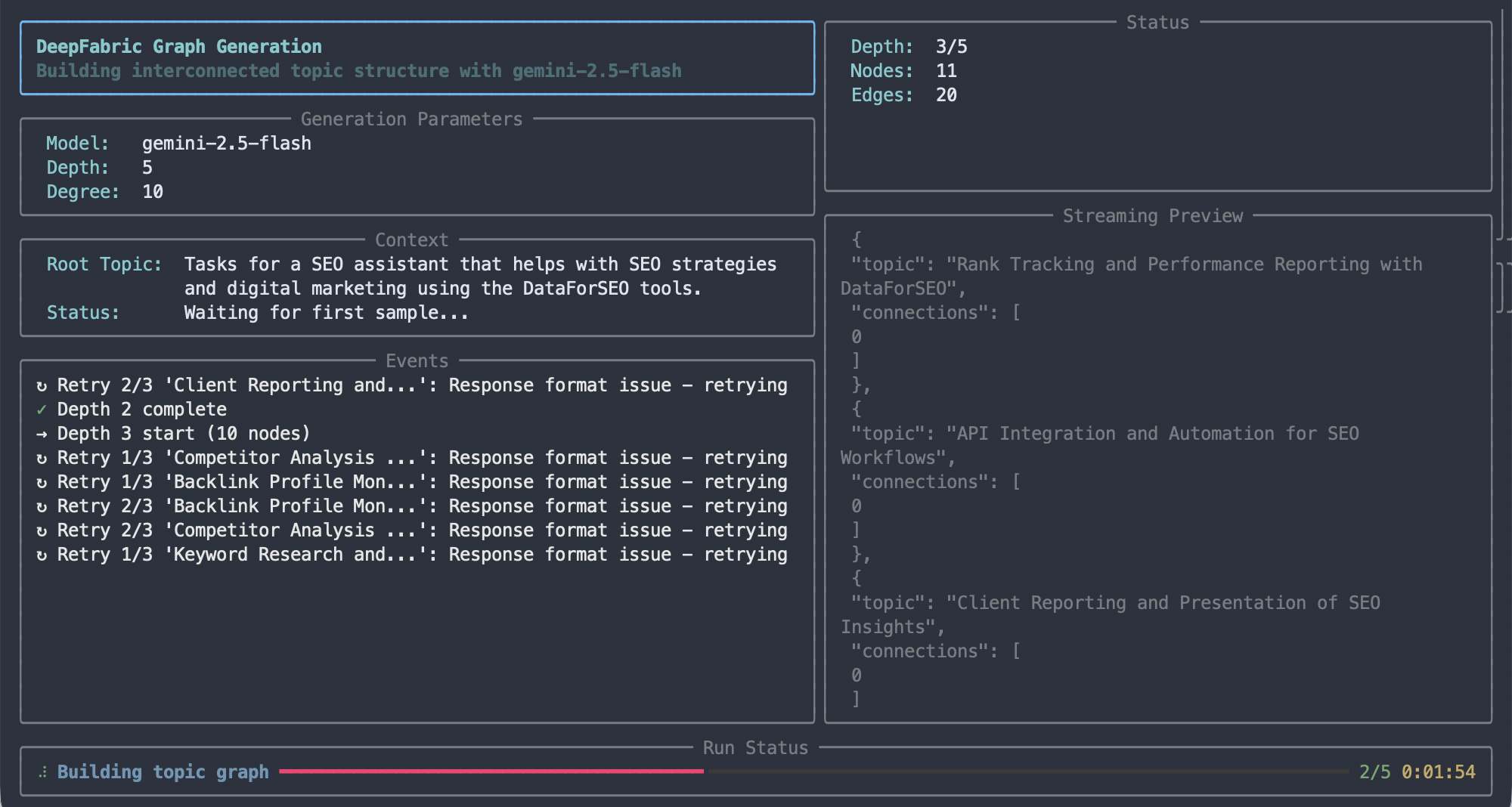
You'll see the CLI starting to create topics and interacting with the Gemini frontier model. For a 5x5 graph, this took under 5 minutes, resulting in a new file: dataforseo-topic-graph.jsonl.
 Topic graph generation
This JSON file is a valid Directed Acyclic Graph (DAG). Looking through it, you can see the topics distilled from the frontier model. Examining and refining this topic graph is a whole subject in its own right—we'll cover this in a separate blog post.
If you want to explore the graph now, you can ask Claude Code to help:
Create a new Jupyter notebook for analyzing the dataforseo-topic-graph.jsonl
topic graph file as a DAG using the NetworkX libraries and provide features
to examine the DAG in detail.
You can use the NetworkX library to examine the topics created, determine their diversity, and understand their relationships. I've included a python notebook as part of the repo that accompanies this post as a starter.
Generating the Dataset
With the topic graph successfully generated, it now acts as the structural blueprint for our synthetic dataset. DeepFabric will iterate over this graph node by node, using the detailed topics to drive the distillation process from the frontier model.
For each topic, DeepFabric generates complex, conversational synthetic data samples—detailed user queries, thought processes, and model responses. Crucially, when the distilled response requires specific SEO information, the frontier model is prompted to incorporate an explicit tool call, and DeepFabric simulates the execution against our local mock DataForSEO SPIN service.
Configuration for Dataset Generation
The dataset generation configuration is in the same YAML file we used for the topic graph: spin-dataforseo.yaml. We're interested in two sections: generation and output. The DeepFabric documentation is super helpful here.
The generation section includes a system prompt (generated by Claude Code) stating that the model will act as an SEO and digital marketing assistant with access to the DataForSEO suite of tools.
We'll be creating an agent reasoning dataset using chain-of-thought (CoT) reasoning, where the thought process or "trace" of how the model reaches its answer is captured. In an agent dataset, the language model will call external tools (via API calls) to help fulfill its function.
For our SEO assistant, the reasoning pathway includes calls to the DataForSEO API to get up-to-date information (like website rankings for certain keywords). When generating this dataset, these API calls are made against the SPIN framework so it can learn the correct calling syntax and semantics.
Here's the relevant configuration:
yaml
There are also configuration options that shape each data sample:
max_per_query: Maximum number of tool calls that can be made within each samplemax_agent_steps: Maximum number of steps reacting to the initial action request
You can adjust these numbers. For example, if a request asks about a website's SEO health, the model might make multiple tool calls as part of its response before summarizing the final answer.
yaml
We'll use Gemini again for the LLM, but this time with a lower temperature setting to ensure more consistent, less random responses as part of the dataset generation:
yaml
Finally, we need to specify the number of samples to generate. Let's start small to verify everything works before scaling up:
yaml
We'll create 10 samples and run the generation in parallel with 2 threads. The final dataset will be saved to dataforseo-dataset-graph.jsonl.
Save any changes to your configuration file and let's generate the data:
shell
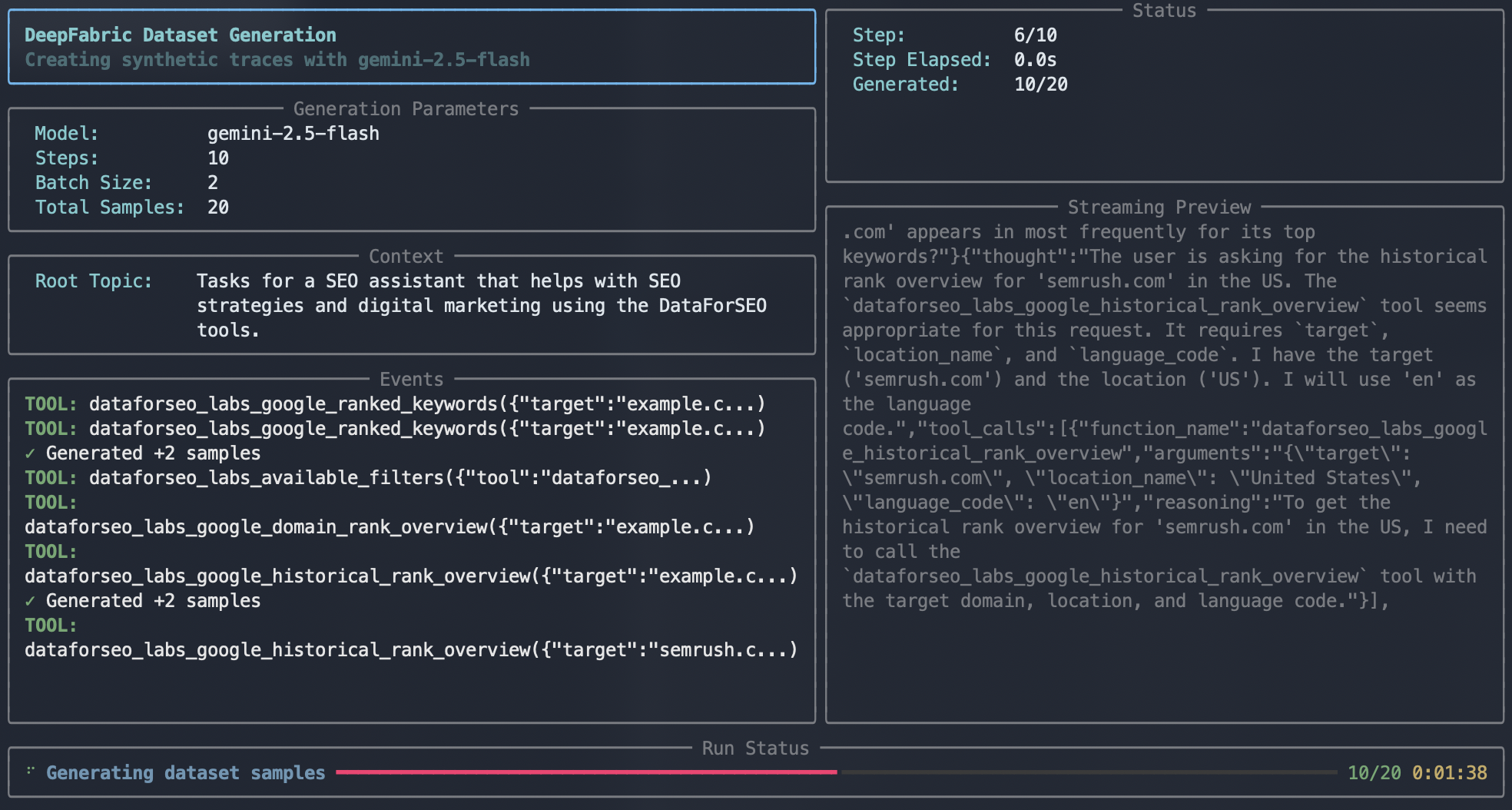
As the data generates, you can see the ReAct sequence playing out in the streaming preview—this is the conversation taking place with the Gemini LLM as the data is distilled. In the events window, you'll see the calls to the SPIN service happening in real time.
 Dataset generation
With the dataset generated (the 10 samples took about 5 minutes), the dataset is saved to file.
Examining the Dataset
To get a better look at the dataset, we can upload it to Hugging Face and use their dataset explorer:
shell
Once uploaded, you can view the data at: https://huggingface.co/datasets/scp7/dataforseo
Now I'm ready to generate a much larger dataset of many thousand samples for use in Part 2 of this series.
What's Next?
Now that the foundational dataset is generated, it's time to put this data to work. In Part 2 of this tutorial series, we'll:
- Take the
dataforseo-dataset-graph.jsonlfile and use it to fine-tune a model - Transfer the complex knowledge of the DataForSEO API structure and usage patterns into the AI
- Implement a simple agent framework to interact with this specialized model
- Demonstrate how the AI can correctly interpret user requests and utilize the learned DataForSEO tool calls against our mock SPIN service to execute complex SEO analysis and strategy tasks
The methodology we've covered here isn't limited to SEO assistants—you can apply this same approach to any tool-calling scenario. The combination of DeepFabric's synthetic data generation capabilities with proper tool integration creates a powerful foundation for building specialized AI agents.
Stay tuned for Part 2, where we'll bring this SEO assistant to life!
Example Files and Code
All the configuration files, scripts, and mock data referenced in this tutorial are available in the companion GitHub repository:
Repository: deepfabric-dataforseo-blog
The repository includes:
spin-dataforseo.yaml- Complete DeepFabric configuration filedataforseo-schema.yaml- DataForSEO MCP server tool schemadataforseo-mock-data.json- Comprehensive mock API responsesload-dataforseo-mock-data.sh- Script to load mock data into SPINanalyze-topic-graph.ipynb- Jupyter notebook for analyzing the generated topic graph- Example topic graphs and dataset samples
Feel free to clone the repository and use these files as a starting point for your own tool-calling dataset generation projects.